In the fast-paced environment of a restaurant kitchen, clear communication and efficient order management are critical to success. Traditional paper ticket systems, while familiar, create bottlenecks, errors, and confusion during busy service hours. Enter the Kitchen Display System (KDS)—a digital solution that's revolutionizing how restaurants manage orders from counter to kitchen.
If you're still relying on printed tickets, thermal printers, and manual order tracking, it's time to discover how a KDS can transform your kitchen operations, reduce waste, and improve customer satisfaction.
What is a Kitchen Display System?
A Kitchen Display System is a digital screen that displays orders in real-time directly to kitchen staff. It replaces traditional paper tickets with a clear, organized digital interface that shows:
- Order details with item names and modifications
- Preparation times and order priority
- Table or order numbers
- Special instructions and allergen information
- Order status and completion tracking
The Problems with Paper Tickets
Before diving into KDS benefits, let's acknowledge the challenges of traditional paper-based systems:
1. Lost or Misplaced Tickets
Paper tickets can fall off spikes, get splattered with grease, or become illegible. A single lost ticket means a forgotten order and an unhappy customer.
2. Poor Readability
Handwritten modifications, faded thermal print, or kitchen heat can make tickets difficult to read, leading to preparation errors.
3. No Real-Time Updates
When orders are modified or cancelled, there's no easy way to update the kitchen without manual intervention.
4. Limited Visibility
Paper tickets provide no overview of pending orders, making it difficult to manage kitchen workflow during rush hours.
5. Environmental Waste
Hundreds of paper tickets per day create unnecessary waste and ongoing paper and printer supply costs.
Key Benefits of Kitchen Display Systems
1. Improved Order Accuracy
Digital orders eliminate handwriting errors and ensure kitchen staff receive clear, legible instructions. Special requests, modifications, and allergen warnings are prominently displayed, reducing mistakes.
"Since implementing KDS, our order accuracy improved by 95%, and customer complaints about wrong orders virtually disappeared." - Restaurant Owner
2. Faster Service Times
KDS organizes orders by priority and preparation time, helping kitchen staff work more efficiently. Orders are displayed instantly—no waiting for printers or runners to deliver tickets.
- Real-time order routing to appropriate stations
- Visual prep time countdowns to manage timing
- Automatic color-coding for order urgency
- Batch preparation for similar items
3. Better Kitchen Workflow Management
A good KDS provides kitchen managers with complete visibility over all active orders. Staff can see which items are in progress, which are ready, and which need immediate attention.
4. Seamless POS Integration
Modern KDS solutions integrate directly with your POS system. When a server enters an order at the POS, it appears instantly on the appropriate kitchen screen—no manual entry or ticket printing required.
5. Real-Time Modifications
Need to modify or cancel an order? Changes made at the POS are immediately reflected on the KDS, preventing wasted food and preparation time.
6. Performance Analytics
KDS tracks valuable metrics that paper tickets never could:
- Average preparation times by item and station
- Peak hour performance data
- Staff efficiency metrics
- Order bottlenecks and delays
7. Multi-Station Coordination
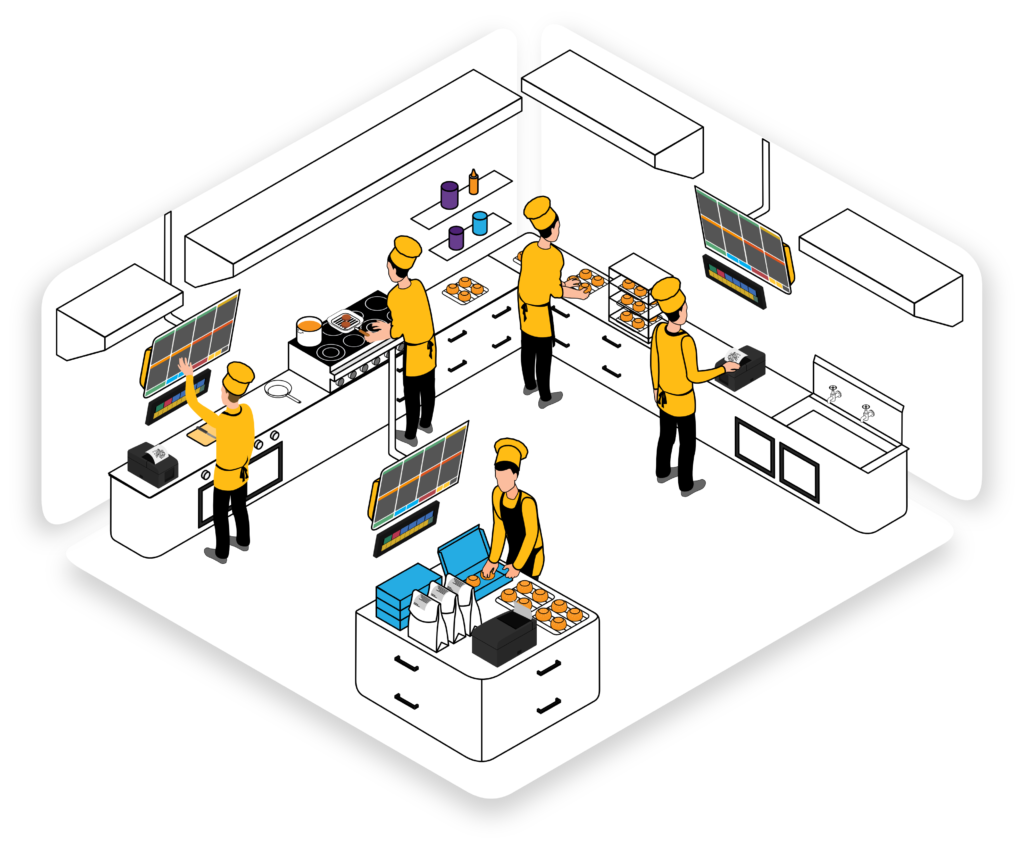
For kitchens with multiple stations (grill, fryer, salad, dessert), KDS ensures each station sees only relevant items while maintaining overall order coordination. This prevents confusion and improves timing.
8. Cost Savings
While there's an initial investment, KDS quickly pays for itself through:
- Eliminated paper and printer supply costs
- Reduced food waste from errors
- Fewer remade orders
- Lower labor costs from improved efficiency
Essential Features to Look For
When choosing a KDS for your restaurant, prioritize these features:
Intuitive Interface
Your kitchen staff should understand the system with minimal training. Large, clear fonts and color-coded priorities are essential.
Bump Bar Compatibility
Physical bump bars let staff mark orders complete with a simple touch—crucial in fast-paced kitchens where touchscreen interaction is impractical.
Prep Time Tracking
Automatic timers show how long each order has been pending, helping staff prioritize and maintain service standards.
Customizable Views
Different stations need different information. Your KDS should allow custom views for grill, salad, dessert, and other stations.
Offline Functionality
Internet outages happen. Choose a KDS that can operate offline and sync when connectivity returns.
Mobile Compatibility
Some systems offer tablet or smartphone apps, allowing managers to monitor kitchen performance from anywhere.
Implementation Best Practices
1. Plan Your Kitchen Layout
Determine how many displays you need and where to position them for optimal visibility without disrupting workflow.
2. Train Thoroughly
Dedicate time to training all kitchen staff before going live. Practice during slow periods before switching completely from paper.
3. Start with a Parallel Run
Run KDS alongside paper tickets for a few days to build confidence and catch any issues before going fully digital.
4. Customize for Your Menu
Configure prep times, priority rules, and station routing based on your specific menu and kitchen setup.
5. Gather Feedback
Ask kitchen staff what's working and what needs adjustment. Small configuration tweaks can significantly improve usability.
Upgrade Your Kitchen with Restomate KDS
See how our integrated Kitchen Display System can streamline your operations and boost efficiency
Book a DemoCommon Concerns Addressed
"What happens if the screen fails during service?"
Quality KDS solutions include redundancy options and can quickly revert to paper tickets if needed. Cloud-based systems also ensure data isn't lost.
"Will our older kitchen staff adapt?"
Modern KDS interfaces are designed for simplicity. With proper training and a gradual transition period, staff of all ages successfully adapt to digital systems.
"Is it expensive to implement?"
Initial costs vary, but most restaurants see ROI within 6-12 months through reduced waste, improved efficiency, and eliminated printer supplies.
The Future is Digital
Kitchen Display Systems are no longer a luxury—they're becoming standard in modern restaurants. As labor costs rise and customer expectations increase, the efficiency gains from KDS become increasingly critical to profitability.
The transition from paper to digital may seem daunting, but the benefits are clear: fewer errors, faster service, better data, and happier customers. Most importantly, your kitchen staff will appreciate the clarity and organization a good KDS provides.
Ready to Go Digital?
Restomate's Kitchen Display System integrates seamlessly with our complete restaurant management platform, providing a unified solution for front and back of house operations.
Our KDS features real-time order tracking, multi-station support, customizable layouts, and comprehensive analytics—all designed specifically for the demanding restaurant environment.
Make the switch to digital kitchen management and join thousands of restaurants already experiencing the benefits of modern kitchen technology.